
What is SuperFlow Launcher?
SuperFlow Launcher is a free Android application that automatically finds your SuperFlow device and opens the SuperFlow configuration page.
It works with both:
- SuperFlow Wi-Fi mode
- SuperFlow Hotspot mode
No IP addresses or network configuration are required.
Why use SuperFlow Launcher?
Benefits:
✅ Automatically locates your SuperFlow device
✅ Works with Wi-Fi and Hotspot connections
✅ No need to remember access addresses
✅ Opens the SuperFlow interface with a single tap
✅ Recommended for Android users
First-Time Setup
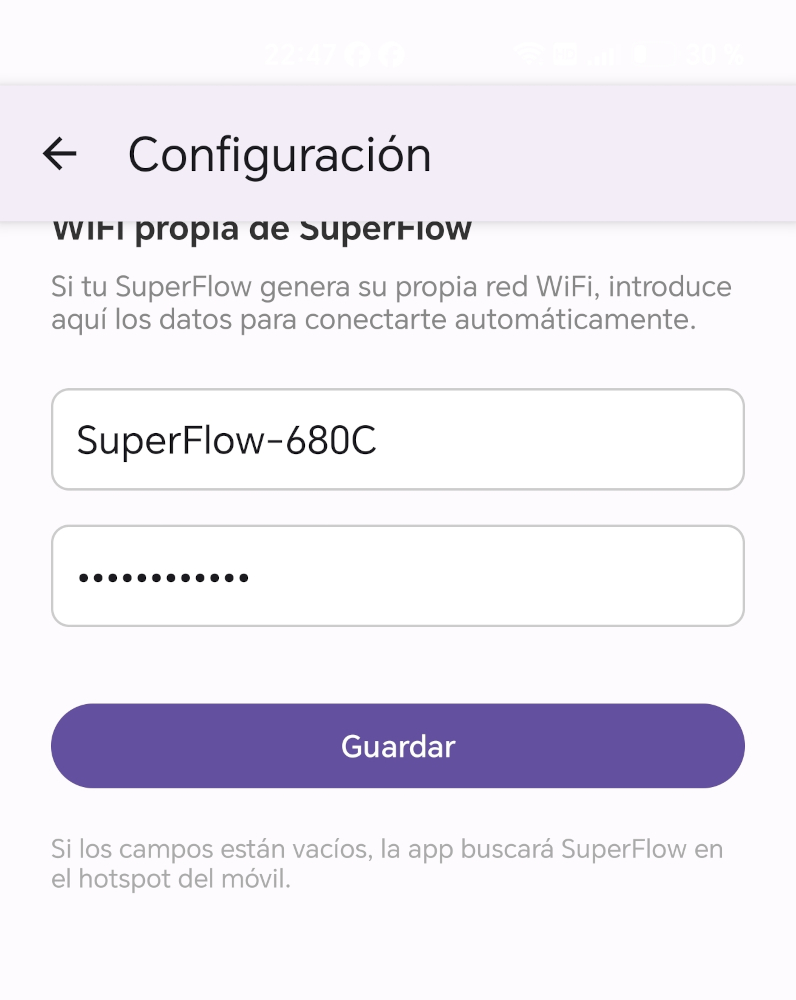
Before using SuperFlow Launcher for the first time, you must enter your SuperFlow Wi-Fi credentials.
- Open SuperFlow Launcher.
- Tap the three-dot menu in the upper-right corner.
- Select Settings.
- Enter the Wi-Fi network name (SSID) and Wi-Fi password shown on the label attached to your SuperFlow device.
- Save the settings.
Important: These are exactly the same Wi-Fi credentials used during the initial SuperFlow Wi-Fi setup process.
Video Demonstration
The following video shows how SuperFlow Launcher automatically detects the device and opens the SuperFlow interface.
How to Use
Once the Wi-Fi credentials have been configured:
- Open SuperFlow Launcher.
- Tap Find SuperFlow.
- Wait a few seconds while SuperFlow Launcher searches for your device.
- Once detected, the SuperFlow interface will open automatically.
Download
Download SuperFlow Launcher APK
Important Notes
- Android only.
- SuperFlow Launcher does not modify any SuperFlow settings.
- The application only simplifies access to the SuperFlow web interface.
- An internet connection is not required.
Troubleshooting
SuperFlow Launcher cannot find my SuperFlow device
Check the following:
Motorcycle ignition is OFF
SuperFlow must be powered on before it can be detected.
Turn the motorcycle ignition ON
Hotspot mode is configured but not enabled
If your SuperFlow has been configured to use Hotspot mode, the hotspot must be enabled before SuperFlow Launcher can connect.
Enable the SuperFlow hotspot and wait for the connection to be established before launching the application.
Incorrect Wi-Fi credentials
Verify that the Wi-Fi network name (SSID) and password entered in SuperFlow Launcher exactly match the information shown on the label attached to your SuperFlow device.
SuperFlow Launcher uses these credentials to automatically connect to your SuperFlow Wi-Fi network.
Device still cannot be found
Perform a SuperFlow Factory Reset and repeat the Wi-Fi setup procedure.
 English
  Spanish